
Most people spend years waiting for the perfect lighting or the latest gear, but here’s the truth: the best time to start your YouTube channel was five years ago, and the second-best time is right now.
Step 1: Set up a YouTube Channel.
1. Create a Brand Account.
Don’t just use your personal Gmail name. A Brand Account lets you use a custom name and add managers later.
You don’t need a cinema camera to start a movement.”
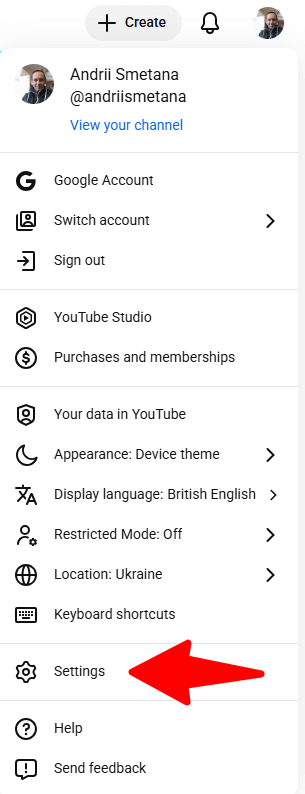
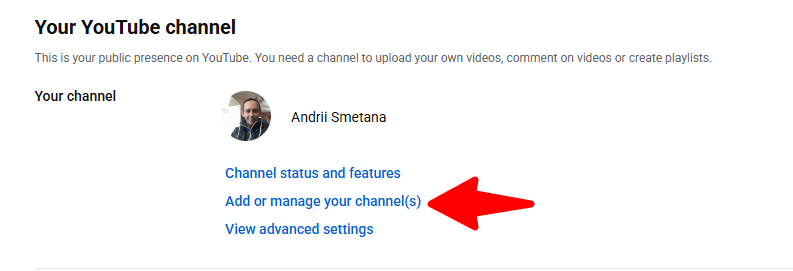
- Go to YouTube Settings > Add or manage your channels > Create a channel. Just 3 clicks.
Click: Settings
Click: Add or manage your channel(s)
Click: Create a channel

- Verification: This is critical. Go to Settings > Channel > Feature Eligibility. Verify your phone number to unlock custom thumbnails and videos longer than 15 minutes.
2. Branding Your Channel.
- Profile Picture: 800 x 800 px. Use a clear photo of your face or a simple logo.
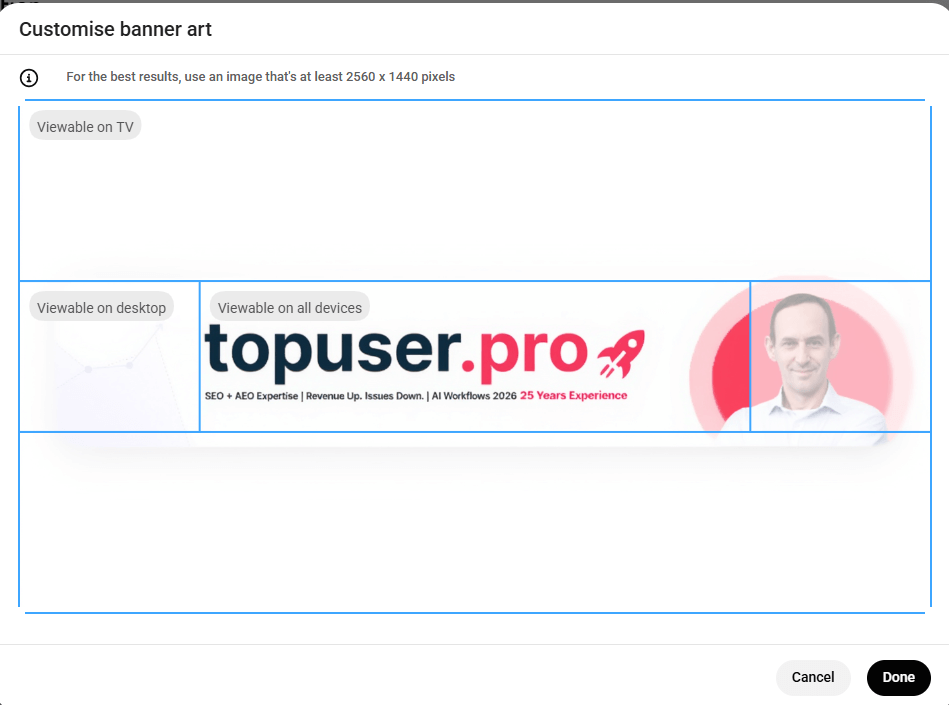
- Banner: 2560 x 1440 px. This is your billboard. State clearly what you do. Example: New tech reviews every Tuesday.
- Handle: Claim your @username early so it matches your other social accounts.
Step 2: The Production: Filming & Editing.
3. Equipment: Keep it Simple.
In 2026, authentic beats were overproduced.
- Camera: Your smartphone is plenty. Shoot in 4K if possible.
- Audio: This is more important than video. A $30 lavalier mic is better than a $1,000 camera with bad sound.
- Lighting: Sit facing a window. Natural light is free and beats most cheap LED panels.
4. The “Hook-Body-CTA” Formula.
- The Hook (0-15s): Tell them exactly what they’ll gain. No long intros!
- The Body: Deliver on your promise. Use “Jump Cuts” (cutting out the ums and ahs) to keep the energy high.
- The CTA: Ask for the sub, but give them a reason why.
Step 3: The Upload & Optimization. SEO.
5. The “Scroll-Stopping” Thumbnail.
Your thumbnail is your packaging. If it looks boring, nobody clicks.
- Pro Tip: Use high-contrast colors (yellow/red/neon) and a close-up of a face showing emotion.
- Text: Max 4-5 words. Don’t repeat the title. Complement it.
6. Video Metadata.
- Title: Put your main keyword at the beginning.
- Bad: My first vlog about travel in 2026.
- Good: Travel Guide 2026: 5 Secrets You Didn’t Know.
- Description: The first 2 lines are gold because they show up in search results. Include your keyword here.
- Chapters: Add timestamps (e.g.,
02:30 - How to set up) in the description. YouTube loves this for SEO.
Social Media Launch Strategy
Here is how to distribute this “Beginner’s Guide” content:
| Platform | Strategy |
| Long-form post: “Why YouTube is still the #1 ROI for personal brands in 2026.” | |
| “Behind the scenes” photo of your setup with a link to the guide. | |
| X (Twitter) | A 5-tweet “Mega-thread” summarizing the steps. |
| Telegram | Direct “Cheatsheet” PDF or a voice note explaining the first step. |
| A Reel showing your “Filming vs. Reality” setup. Backstage. | |
| Threads | Start a conversation: What’s the one thing stopping you from starting YouTube? |
Just Start Your Youtube channel.
Starting a YouTube channel is a marathon, not a sprint. You don’t need to be a professional editor or a cinematic genius to make an impact.
You just need to show up, be yourself, and provide value to your audience. Remember, every big YouTuber you follow once had zero subscribers and a messy first video.
The algorithm doesn’t reward perfection. It rewards consistency and authentic connection. So, stop overthinking the gear, hit record, and start your journey today.
Your future self will thank you for beginning now.
FAQ.
What is the essential equipment needed to start a Youtube Channel as a beginner?
For beginners, the key is to keep your setup simple and avoid waiting for the perfect gear. A smartphone is more than enough to begin. A basic 30 dollar lavalier microphone will do the job.
How can I optimize my video thumbnails to stop scrolling?
Use high contrast, a clear focal point, and minimal text. Show one strong emotion or result, keep the background simple, and make sure the subject is large and readable on a small screen.
How can I optimize my video metadata to improve search rankings?
Research primary and secondary keywords, then place the main keyword naturally in the title, description, and first tags. Write a clear, benefit-driven title that matches search intent. Use detailed descriptions with related terms, add accurate tags, chapters, and relevant categories to strengthen contextual relevance and discoverability.

Content Strategist at Topuser.Pro and DeepCopywriting. I craft expert-level copy for E-commerce, corporate websites, and SEO-driven platforms. From deep-dive articles to conversion-focused product descriptions, I deliver content that ranks in Google and resonates with global audiences. Expert in the nuances of the 2026 digital landscape.
